Git Merge vs Rebase: Differences, Use Cases and Examples
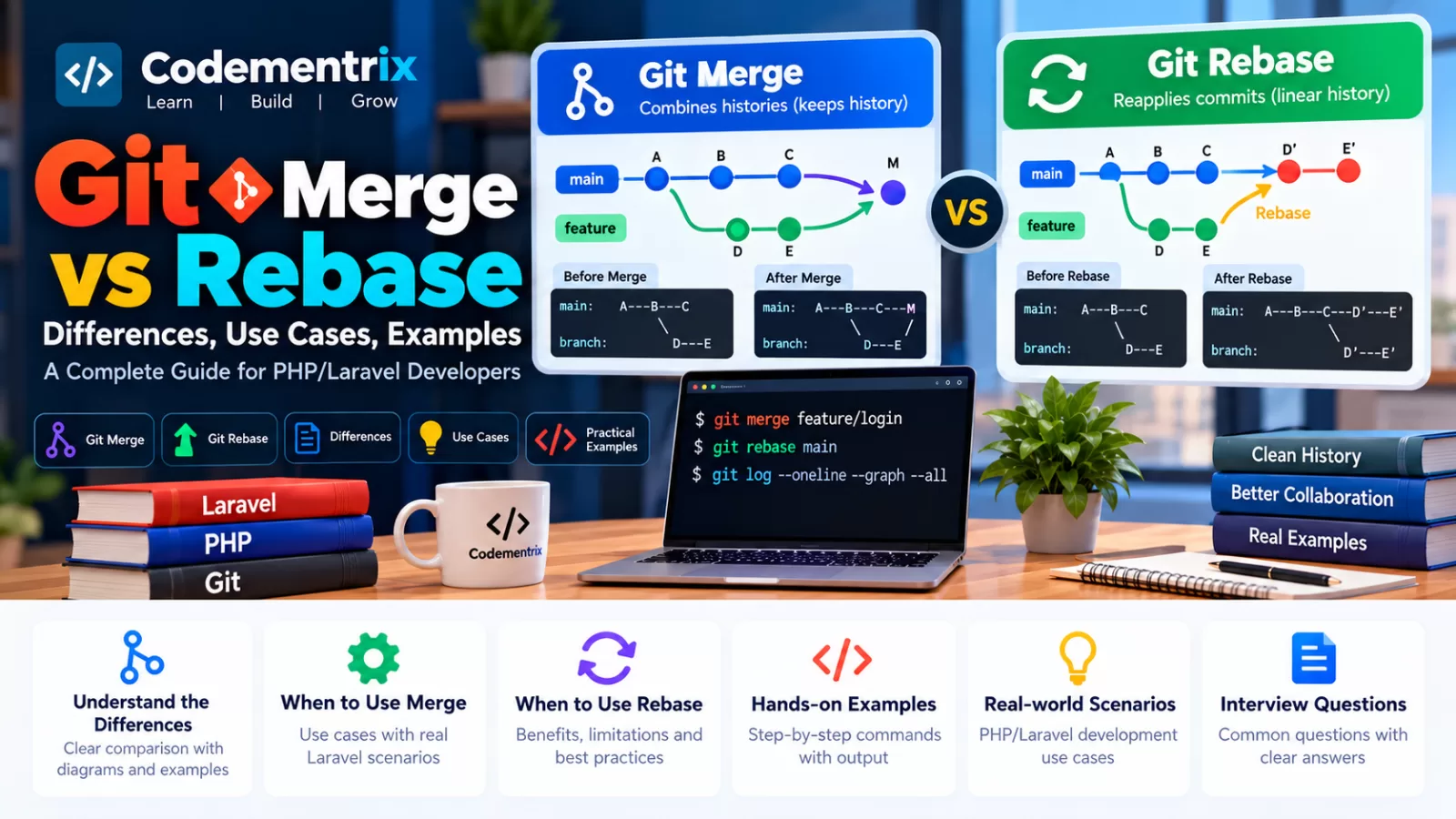
Git Merge vs Rebase: Differences, Use Cases and Examples
Git Merge and Git Rebase are two important commands used to integrate changes from different Git branches.
If you are a PHP or Laravel developer, you will frequently encounter situations where your feature branch is behind the development branch and you need to bring the latest changes into your work.
For example, imagine that you are developing a Laravel payment feature:
develop
    |
    └── feature/payment
While you are working on the payment feature, other developers add several commits to develop.
Now you need to update your feature branch. You have two common approaches:
git merge develop
or:
git rebase develop
Both can integrate the latest changes, but they work differently and produce different commit histories.
In this article, we will understand Merge vs Rebase from the ground up with diagrams, commands, Laravel examples, use cases, conflict resolution, and interview questions.
Table of Contents
- What is Git Merge?
- Git Merge example
- How merge affects history
- What is Git Rebase?
- Git Rebase example
- How rebase affects history
- Git Merge vs Rebase
- Do merge and rebase produce the same result?
- When should you use Git Merge?
- When should you use Git Rebase?
- Laravel merge example
- Laravel rebase example
- Merge conflict resolution
- Rebase conflict resolution
- How to abort merge or rebase
- Interactive rebase
- The golden rule of rebase
- Practical Laravel workflow
- Real-world scenarios
- Git Merge vs Rebase interview questions
- Command cheat sheet
- Conclusion
1. What is Git Merge?
Git merge combines the changes from one branch into another branch.
Suppose you have:
main
feature/login
Your login feature is complete and you want to integrate it into main.
First switch to the target branch:
git switch main
Then merge the feature branch:
git merge feature/login
Git combines the histories of the two branches.
Basic idea
Before merge:

main:       A---B---C
                 \
feature:          D---E


After merge:

main:       A---B---C-------M
                 \         /
feature:          D---E-----
Here, M represents a merge commit when Git needs one.
If the target branch has not diverged, Git may instead perform a fast-forward merge.
2. Git Merge Example
Let's use a Laravel example.
Suppose your project contains:
main
feature/customer-api
You developed:
app/Models/Customer.php

app/Http/Controllers/CustomerController.php

routes/api.php
You commit your work:
git add .

git commit -m "Add customer API"
Now switch to the target branch:
git switch main
Merge:
git merge feature/customer-api
The customer API changes are now integrated into main.
3. How does Git Merge affect commit history?
One important characteristic of merge is that it can preserve the fact that two branches developed separately.
For example:
             D---E
            /     \
A---B---C---------M
The merge commit M records the integration point.
You can inspect this history with:
git log --oneline --graph --all
This can be useful when the project wants the branch structure and integration points to remain visible in its history.
4. What is Git Rebase?
Git rebase takes commits from one branch and reapplies them on top of another base commit.
The result is often a more linear history.
Suppose you have:
main:       A---B---C
                 \
feature:          D---E
Run:
git switch feature

git rebase main
Git takes the feature commits and reapplies them on top of the latest main:
main:       A---B---C
                     \
feature:              D'---E'
The new commits are represented as D' and E' because they are newly created commits with different commit identities from the original D and E.
5. Git Rebase Example
Suppose you are developing:
feature/payment
Meanwhile, develop has received new commits.
First fetch the latest remote information:
git fetch origin
Switch to your feature branch:
git switch feature/payment
Then rebase onto the latest remote development branch:
git rebase origin/develop
Conceptually:
Before:

develop:          A---B---C
                       \
feature/payment:       D---E


After:

develop:          A---B---C
                           \
feature/payment:           D'---E'
Your feature commits have been reapplied on top of the latest develop.
6. How does Rebase affect commit history?
Rebase rewrites the commits that are being replayed.
For example:
Before:

A---B---D---E
     \
      C
After rebasing the feature commits onto C:
A---B---C---D'---E'
The original D and E are replaced in the branch's visible history by newly created commits D' and E'.
This is the most important reason to be careful when rebasing commits that other developers have already based work on.
7. Git Merge vs Rebase: Main Differences
``` ```
| Git Merge | Git Rebase |
|---|---|
| Combines branch histories | Replays commits onto another base |
| Can create a merge commit | Usually produces a more linear history |
| Preserves the existing branch topology | Rewrites the commits being rebased |
| Generally safer for already-shared history | Requires care with already-shared history |
| Useful when preserving integration history matters | Useful when a clean linear feature history is desired |
Simple way to remember
MERGE

Combine histories
       +
Preserve branch structure


REBASE

Move/replay commits
       +
Create a linear history
       +
Rewrite replayed commits
8. Do Merge and Rebase produce the same result?
They can integrate the same logical changes, but the resulting commit history can be different.
Merge
A---B---C
     \   \
      D---E---M
Rebase
A---B---C---D'---E'
Both can result in the feature changes being present, but the history records the integration differently.
This distinction is important during code review and when investigating project history.
9. When should you use Git Merge?
Merge can be useful when you want to combine branches while preserving their existing relationship in the history.
Use case 1: Integrating a completed feature
git switch develop

git merge feature/payment
Use case 2: Preserving integration history
If the team wants the history to show that a feature branch was integrated at a specific point, merge can be appropriate.
Use case 3: Shared branch history
Merge does not require rewriting the commits on the source branch in the same way rebase does, making it a common choice when working with already-shared history.
Use case 4: Simple team workflows
Some teams prefer merge because it is straightforward and avoids rewriting shared commits.
10. When should you use Git Rebase?
Rebase can be useful when you want to update a feature branch with the latest base branch while maintaining a linear history.
Use case 1: Update your own feature branch
git fetch origin

git switch feature/payment

git rebase origin/develop
Use case 2: Clean up local commits
Before sharing your feature branch, you may use interactive rebase to organize your local commits.
Use case 3: Maintain a linear history
A team may prefer a history that looks like:
A---B---C---D'---E'
rather than many merge commits.
Important
Rebase is not inherently "better" than merge. They solve related but different history-management needs.
The correct choice depends on the project's workflow and team conventions.
11. Practical Laravel Example: Using Merge
Imagine a Laravel e-commerce project.
You have:
develop
feature/product-search
The feature branch contains:
app/Http/Controllers/ProductController.php

app/Services/ProductSearchService.php

resources/views/products/search.blade.php
You finish the feature and run tests:
php artisan test
Then:
git add .

git commit -m "Add product search"

git switch develop

git pull origin develop

git merge feature/product-search
Now the feature is integrated into develop.
In a Bitbucket-based team, the merge may instead happen through a Pull Request after review and required checks.
12. Practical Laravel Example: Using Rebase
Now suppose you are working on:
feature/payment
Other developers have added changes to:
develop
You want your feature branch to be based on the latest development code.
Step 1: Fetch latest remote branches
git fetch origin
Step 2: Switch to feature branch
git switch feature/payment
Step 3: Rebase
git rebase origin/develop
Git attempts to replay your payment commits on top of the latest origin/develop.
Step 4: Run tests
php artisan test
If everything passes, your branch now has the updated base.
13. Merge Conflict: Step-by-Step
Conflicts can happen with both merge and rebase.
Suppose both branches modify:
app/Services/PaymentService.php
You run:
git merge feature/payment
Git reports a conflict.
Step 1: Check the status
git status
Step 2: Open the conflicted file
You may see:
<<<<<<< HEAD

return $this->processPayment($amount);

=======

return $this->processPayment($amount, $currency);

>>>>>>> feature/payment
Step 3: Resolve the code
Decide which code is correct or combine the changes as appropriate.
Remove the conflict markers.
Step 4: Stage the resolved file
git add app/Services/PaymentService.php
Step 5: Complete the merge
git commit
Depending on the Git workflow and merge mode, the exact final command can vary, but the key process is: inspect → resolve → stage → complete.
14. Rebase Conflict: Step-by-Step
Suppose you run:
git rebase origin/develop
and Git finds a conflict.
First:
git status
Resolve the conflicting Laravel files.
Then stage the resolution:
git add app/Services/PaymentService.php
Continue:
git rebase --continue
If another conflict occurs, repeat the process.
If you decide you don't want to continue the rebase:
git rebase --abort
This returns the branch to the state it was in before the rebase operation started, subject to Git's normal rebase behavior.
15. How to abort Merge or Rebase
Abort a merge
git merge --abort
This attempts to return the working tree to the state before the merge began.
Abort a rebase
git rebase --abort
This attempts to restore the branch to its state before the rebase started.
Important
Before aborting, make sure you understand which local changes were present before the operation. Git operations involving conflicts should always be handled carefully, especially when you have uncommitted work.
16. What is Interactive Rebase?
Interactive rebase allows you to modify the sequence of commits being replayed. It is commonly used to clean up local commit history before sharing it.
Example:
git rebase -i HEAD~3
This opens an editor showing the last three commits.
You may see something similar to:
pick a123456 Add payment controller
pick b234567 Fix payment validation
pick c345678 Update payment message
You can use operations such as:
- pick — keep the commit
- reword — change the commit message
- squash — combine commits and edit the message
- fixup — combine commits while discarding the later message
- drop — remove a commit from the rewritten sequence
For example, several small local commits:
Add payment controller
Fix typo
Fix validation
Fix validation again
could potentially be cleaned into a smaller set of meaningful commits before sharing the branch.
Use interactive rebase carefully because it rewrites commit history.
17. The Golden Rule of Git Rebase
One of the most important rules to remember is:
Avoid rebasing commits that other developers are already depending on unless your team explicitly coordinates that history rewrite.
Why?
Because rebase creates new commit identities for the commits it replays.
For example:
Original:

A---B---D---E
     \
      C


After rebase:

A---B---C---D'---E'
The original D and E are not the same commits as D' and E'.
If other developers already built work on top of the original commits, rewriting them can create synchronization problems.
18. Practical Laravel workflow: Merge vs Rebase
Scenario
You are developing:
feature/order-management
The development branch has moved forward.
Option A: Merge
git fetch origin

git switch feature/order-management

git merge origin/develop
This integrates the latest development changes while preserving the merge relationship.
Option B: Rebase
git fetch origin

git switch feature/order-management

git rebase origin/develop
This replays your feature commits on top of the latest development branch.
After either operation:
php artisan test
Then push according to your team's workflow.
19. Real-World Scenarios
Scenario 1: Your feature branch is behind develop
You can use either merge or rebase, depending on the project policy.
Merge:
git fetch origin
git merge origin/develop
Rebase:
git fetch origin
git rebase origin/develop
Scenario 2: Your feature branch is private and you want a clean history
Interactive rebase can be useful for cleaning up local commits:
git rebase -i HEAD~5
Afterward, review the branch carefully and run the project's tests.
Scenario 3: The branch is already shared with your team
Be cautious about rebasing it.
If the team is already working from the branch, rewriting its history can require others to resynchronize their local branches.
The team may instead prefer merging changes.
Scenario 4: Production history needs a clear integration point
A merge commit can explicitly record the integration of a feature branch.
git switch main
git merge feature/payment
Whether this is preferred depends on the team's release and history policy.
20. Git Merge vs Rebase Interview Questions
Q1. What is Git Merge?
Git merge combines the changes from one branch into another branch. Depending on the branch history and merge options, it may create a merge commit or use a fast-forward update.
Q2. What is Git Rebase?
Git rebase reapplies commits from one branch onto another base commit, which can produce a more linear history but rewrites the commits being replayed.
Q3. What is the main difference between merge and rebase?
Merge combines histories and can preserve the branch structure through a merge commit. Rebase rewrites the affected commits by replaying them onto a new base.
Q4. Which one should I use: merge or rebase?
There is no universal answer. Follow the project's Git workflow.
For example:
- A team may use merge to preserve branch integration history.
- A developer may rebase their private feature branch to keep its history linear before sharing it.
Q5. Why can rebase be dangerous on a shared branch?
Because rebase rewrites the commits being replayed. Other developers who have based work on the original commits may need to reconcile their branches.
Q6. Can merge create a merge commit?
Yes. When the target branch has diverged from the source branch, a normal merge can create a merge commit.
Q7. What is a fast-forward merge?
A fast-forward merge occurs when the target branch can simply move its branch pointer forward because it has no divergent commits.
For example:
Before:

main:     A---B
               \
feature:        C---D
If main has not diverged, merging the feature can simply move main forward:
main: A---B---C---D
Q8. How do you rebase a feature branch onto develop?
git switch feature/payment

git fetch origin

git rebase origin/develop
Q9. How do you continue after resolving a rebase conflict?
git add <resolved-file>

git rebase --continue
Q10. How do you cancel a rebase?
git rebase --abort
Q11. How do you cancel a merge in progress?
git merge --abort
Q12. What is interactive rebase?
Interactive rebase allows you to edit, reorder, combine, rename, or remove commits in a sequence before sharing rewritten history.
git rebase -i HEAD~3
Q13. Does rebase delete commits?
Rebase rewrites the commits it replays by creating new commit objects. The original commits may become unreachable from the branch's current history, though Git's reflog may allow recovery for a period of time.
Q14. Can you rebase a public branch?
Technically Git allows it, but rewriting history that other developers already depend on can cause collaboration problems. Shared-branch history should only be rewritten when the team explicitly agrees and understands the consequences.
21. Git Merge and Rebase Cheat Sheet
``` ```
| Command | Purpose |
|---|---|
git merge branch |
Merge another branch into the current branch |
git merge --abort |
Abort a merge in progress |
git rebase branch |
Rebase current branch onto another branch |
git rebase origin/develop |
Rebase onto the remote develop branch |
git rebase -i HEAD~3 |
Interactively rewrite the last three commits |
git rebase --continue |
Continue after resolving a rebase conflict |
git rebase --abort |
Abort a rebase in progress |
git rebase --skip |
Skip the current patch during a rebase when appropriate |
git log --graph --oneline --all |
Visualize branch history |
22. Quick Comparison for Interviews
``` ```
| Question | Merge | Rebase |
|---|---|---|
| Combines changes? | Yes | Yes, by replaying commits |
| Can create merge commit? | Yes | No merge commit is created by the rebase operation itself |
| Rewrites replayed commits? | No | Yes |
| Can produce linear history? | Not necessarily | Often yes |
| Good for preserving integration history? | Yes | Not the primary purpose |
| Needs caution on shared history? | Less history-rewrite concern | Yes |
23. Easy way to remember Merge vs Rebase
If you struggle to remember the difference during an interview, use this simple explanation:
MERGE

"Bring the histories together."

A---B---C
     \   \
      D---E---M


REBASE

"Take my commits and replay them
on top of the latest base."

A---B---C---D'---E'
Then explain:
- Merge can preserve the branch structure.
- Rebase rewrites the commits being replayed.
- Merge is commonly used for integrating shared work.
- Rebase is commonly useful for updating or cleaning up a private feature branch.
- The project's team workflow should determine the final choice.
24. Conclusion
Git Merge and Git Rebase are both powerful tools for integrating changes between branches, but they solve the problem in different ways.
Git Merge combines branch histories and can preserve the relationship between the branches through a merge commit.
Git Rebase takes commits and reapplies them onto another base, which can create a cleaner linear history but rewrites the commits being replayed.
For PHP and Laravel developers, the most important thing is not to memorize which command is "better". Instead, understand:
- How merge works
- How rebase works
- How commit history changes
- When a merge is useful
- When a rebase is useful
- Why shared history requires care when rebasing
- How to resolve merge conflicts
- How to resolve rebase conflicts
- How to abort an operation safely
In a real Laravel project, always follow the team's established Git workflow. Different teams may have different rules for Pull Requests, merge commits, rebasing, branch protection, and release branches.
What's Next?
In the next Codementrix Git article, we will cover another very common interview and real-world development problem:
Git Merge Conflicts: How to Identify and Resolve Conflicts
The next article will explain conflict markers, conflict resolution, git status, merge conflicts, rebase conflicts, git merge --abort, git rebase --abort, and practical PHP/Laravel conflict examples.
Was this useful?
No ratings yet — yours can be the first.
Discussion
Notes from readers. Comments appear after a short review.
No comments yet. Start the thread below.